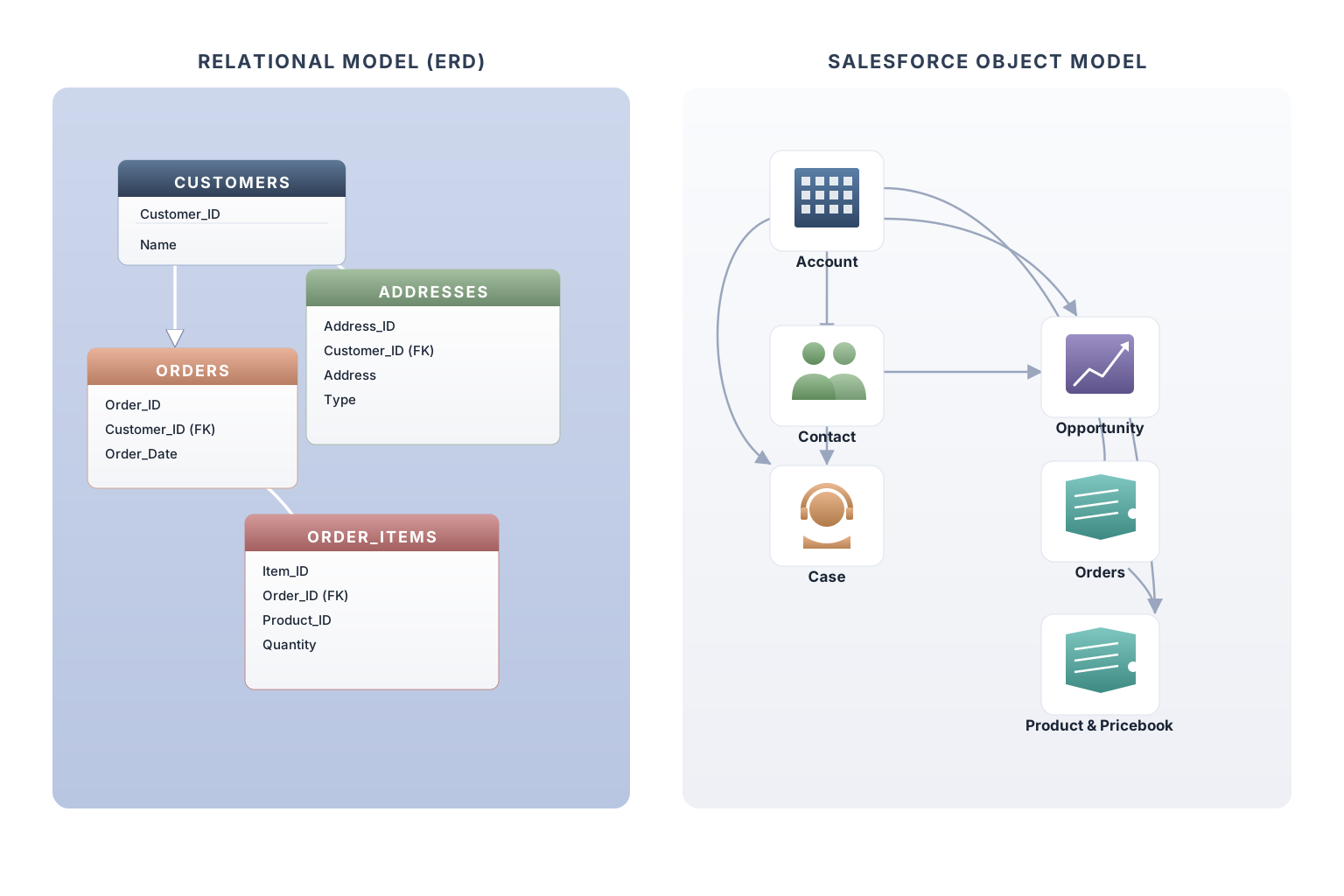
This isn't really a post about Oracle. If you're migrating off Siebel, Dynamics, a homegrown system built in 2009, or anything else with a relational schema older than your newest hire, the same trap is waiting for you. Oracle is just where I've watched it bite hardest, most often, and most expensively. The worst case I've personally seen wasn't even customer data, but the pattern was identical.
Here's the question almost nobody asks in the first three months of a Salesforce migration:
"Are we redesigning the data model, or are we replicating it?"
Everyone thinks they've answered it. The architect says "we're redesigning, of course." The business sponsor nods. The legacy team, quietly relieved that their schema is being respected, also nods. And then, somewhere between the data mapping workshop and the first sprint demo, the project drifts toward a 1:1 replication of the legacy schema with __c slapped on the end of every object name. By the time anyone notices, the org has 40 custom objects mirroring 40 legacy tables, half of them with relationships that made sense in a normalized RDBMS and don't carry their weight on the new platform.
Year one closes. Go-live happens. Then year two starts, and the bill comes due.
A different platform, not a worse one
Salesforce made a deliberate architectural trade. It gives up some of the raw query flexibility of a traditional relational database in exchange for things Oracle was never designed to deliver: a declarative security model, a metadata-driven UI, point-and-click automation, native mobile, an AppExchange ecosystem, and an upgrade path that doesn't require a DBA. That trade is the entire reason you're migrating to it.
The platform's characteristics aren't bugs in disguise. SOQL relationship queries are bounded by design. Sharing and security are configured object by object, which is what makes the model auditable in the first place. Reports and list views work best when the data they need lives close together. Page layouts, validation, and automation all multiply with the number of objects you create. None of these are weaknesses; they're the natural consequences of a platform that prioritizes governance, declarative configuration, and user experience over the join-anything flexibility of a relational database.
The organizations that get year-two value out of their migration are the ones whose data model was designed for that grain. The ones that struggle are the ones that ported a relational schema unchanged and were surprised when it behaved like a ported relational schema.
Salesforce has already done some of this work for you
Take the legacy ADDRESSES table. In a normalized Oracle schema, addresses live in their own table: one row per address, foreign-keyed back to the customer, typed as billing or shipping or primary. The DBA who designed it years ago was following the right discipline for the platform they were on. Storage was the constraint, joins were cheap, and normalization was the virtue.
Now the migration team arrives at Salesforce and faces a choice. The legacy schema has an ADDRESSES table. The instinct is to recreate it: a Customer_Address__c custom object, lookup back to Account, type field, the whole pattern. It's the safe-feeling choice because it preserves the shape of the source. For the most common case, it's not the choice I'd make.
Why? Because Salesforce already provides a default answer for the most common address use case. Open a standard Account record and you'll find Billing Address and Shipping Address as native compound fields. Open a standard Contact and you'll find Mailing Address and Other Address. These are long-standing platform patterns, the platform's design bias is to treat a customer's primary and secondary addresses as attributes of the customer record rather than as records in their own right. For the overwhelming majority of business cases, that default is right, and recreating it as a custom child object is rebuilding something the platform already handed you.
That said, addresses aren't always fields. There are legitimate cases where an address earns its own object: when address history needs to be tracked independently of the customer, when compliance requires an audit trail of every address change, when a single address is genuinely shared by many customers (property portfolios, policyholder risk locations, shipping hubs), when sharing on addresses needs to differ from sharing on the parent, or when the business operates on addresses as first-class records: risk underwriting, clinical address management, logistics routing. These cases are real, and a good architect recognizes them rather than forcing every address into a field.
The rule isn't "addresses are always fields." The rule is "start with the standard fields, and only reach for a custom object when the business genuinely operates on addresses as first-class records with their own lifecycle and governance." That's the position that holds up in regulated industries where the exceptions actually matter.
The same pattern holds across most of the entities a migration touches. Customers map to Account and Contact. Sales pipeline maps to Opportunity. Service requests map to Case. Products and pricing map to Product2 and Pricebook2. Orders, contracts, assets, leads, campaigns, tasks, events: all standard. These objects generally come with better native alignment: more integrations out of the box, broader AppExchange compatibility, mobile layouts that already work, and security defaults auditors expect. Platform investment varies (Account, Contact, Opportunity, Case, and Lead get the heaviest treatment), but the general rule holds: a standard object is almost always a better starting point than a custom one.
Every time you create a custom object that duplicates a standard one, you're opting out of some of that. You're paying to rebuild what the platform already gave you, and committing your future self to maintaining the rebuild forever.
When the standard model doesn't quite fit
This is where most teams reach for a custom object too quickly. Before you do, ask whether record types can solve the problem first.
Legacy systems often model variations of the same entity as separate tables. Commercial customers and consumer customers in two tables. Domestic and international orders in two tables. The legacy answer was usually "different table per flavor, with branching logic in the application layer." The Salesforce answer is record types: one standard object, multiple record types, each presenting a different subset of picklist values and a different page layout to the user, with validation rules and automation conditioned on the record type where needed.
A single Account object with three record types (Commercial, Consumer, Public Sector) gives you three different user experiences, three different data capture flows, and three different page layouts, without ever leaving the standard object. The user opens an Account and sees the layout that matches the type. Reporting still works because everything is on Account. Sharing still works because there's only one object to secure. The integration team doesn't have to reconcile three custom objects with the rest of the world.
In my experience, record types are one of the most underused tools in the platform. They collapse a surprising amount of what migration teams reflexively build into custom objects. If you're not exhausting record types before reaching for a __c, you're likely building debt you'll be paying down two years from now.
When a custom object is the right answer
None of this is an argument against custom objects. They exist for a reason, and when an entity genuinely earns one, build it without apology.
A custom object earns its existence when the entity has a life of its own: its own lifecycle, its own owner, its own sharing rules, its own reporting needs, its own audience independent of any parent record. A loan application has a life of its own. A clinical encounter has a life of its own. A regulatory disclosure has a life of its own. These aren't just attributes of a customer; they're things the business operates on directly, with their own status transitions and their own people working them.
What doesn't earn a custom object is "we had a table for it in Oracle." That's an artifact of how the legacy team chose to normalize their data, on a platform with a different cost model. If the entity is really just a property of its parent (if no one ever opens it independently, no one reports on it across parents, no one assigns it to a different owner), then it's a field, or a small group of fields. It is not a custom object.
This is also not an argument against normalization. Normalization is still a virtue when it's the right answer: when the entity is unbounded, when it has its own lifecycle, when it participates in workflows independently. The point isn't to denormalize for its own sake. The point is to choose the right level of normalization for the platform you're on, deliberately, after exhausting what the platform has already given you. The mistake is making the choice by default in the data mapping phase instead of making it on purpose as an architectural decision.
Three questions to ask before mapping a single field
If you're starting a migration, or you're three months into one and something feels off, here is the framework I'd run before another field gets mapped.
For the big entities (customers, contacts, products, orders, cases, contracts, assets), the answer is often yes, and most migration teams discover only half of what's already there before they start building custom. Review the standard object documentation with your data architect, field by field, before proposing anything new.
Different page layouts per flavor, different picklist values, different validation and automation conditioned on type: all on one object, all reportable together, all secured together. If yes, that's the path.
Its own lifecycle, its own owner, its own sharing model, its own reporting audience. "We had a table for it in Oracle" is not an answer. "Loan officers work this entity independently of the customer record, with their own approval flow and their own audit trail" is.
Run those three questions against every legacy table before mapping a single field, and the data model that emerges will look very different from the source. That's the entire point of migrating to a new platform instead of lifting and shifting on the old one.
What this framework can and can't do
These three questions will get you to the right conversation. They won't get you to the right answer, because the right answer for your org depends on your data volumes, your regulatory environment, your integration surface, your reporting requirements, your team's maturity with the platform, and a dozen other things a blog post can't see. Anyone who claims to know the right data model for your org without sitting inside it is selling you a template, not thinking with you.
What the questions will tell you is whether the right conversation is even happening on your project. If it isn't (if the data mapping exercise is treating the legacy schema as the target instead of the input, if no one in the room is empowered to say no to a 1:1 port, if "we had a table for it" is being accepted as a justification for a custom object), that's the urgent problem. The data model itself can be fixed. The absence of the conversation is what guarantees year two becomes a re-platforming project.
The question to bring to your next migration leadership meeting
If you take one thing from this post into your next migration meeting, make it this:
"Are we redesigning the data model for Salesforce, or are we replicating the legacy schema? And who, by name, has the authority to say no to a 1:1 mapping when the source team pushes back?"
The named person attached to that authority is the difference between a year-two victory lap and a year-two re-platforming project. Get it on the table early. Get it in writing. Get someone in the room who has done this before and is willing to be unpopular for about six weeks in the middle of the project.
The right data model isn't the hard part. The hard part is having the conversation while there's still time to act on the answer.
The data model decision is the first of three that ride alongside each other in month one. The second one catches even experienced teams off guard, because it doesn't look like a data model decision at all. It looks like a security decision. In Part 2, I'll get into why the data model and the sharing model are the same decision, even when your org structure pretends they aren't.