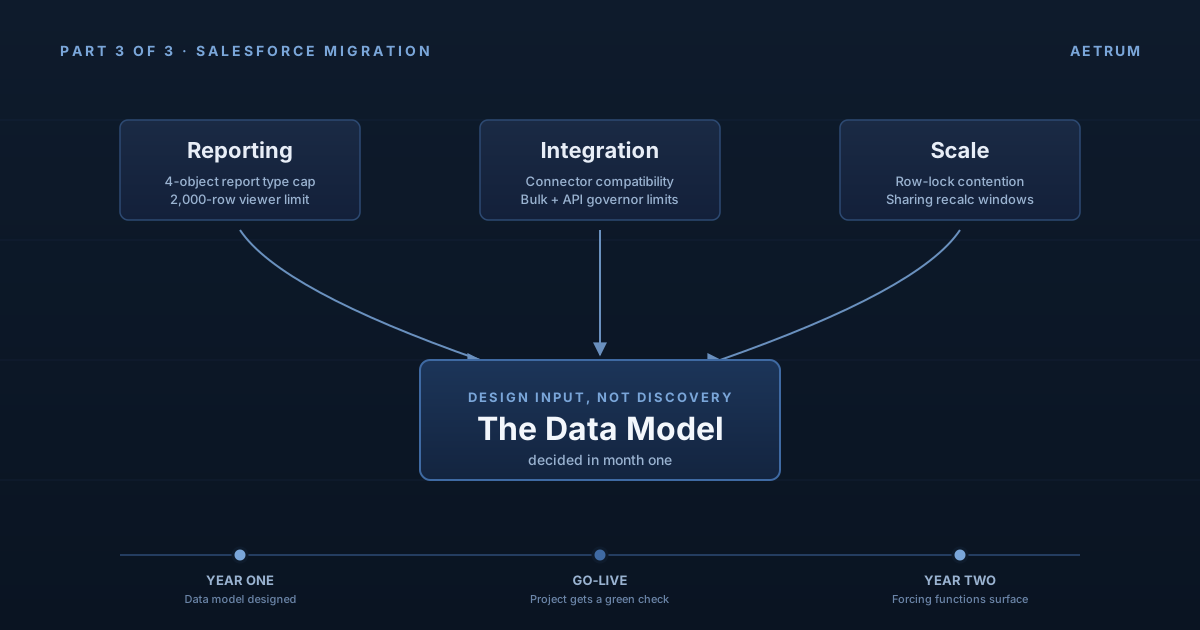
This is the close of a three-part series on the architectural decisions that decide whether a Salesforce migration compounds value or compounds debt. Part one made the case that the data model decision is the one nobody asks about early enough. Part two argued that the relationship choices made in the data modeling workshop are the same choices that decide your sharing model, even when the security workshop is scheduled for two weeks later. This part is about the other half of what gets decided in those same early workshops, and paid for much later: reporting, integration, and scale.
Year one of a Salesforce migration is judged by go-live. The schedule, the budget, the user training, the cutover weekend. If those land, the project gets a green check.
Year two is judged by everything go-live didn't tell you. Reports that the business asks for and the team quietly can't build. Integrations that work in UAT and start tripping limits in production. Data volumes that were fine at 100,000 records and start showing the strain at 5 million. None of these problems show up in the go-live retrospective, because none of them are visible yet. They are, almost without exception, year-one design decisions that the project didn't know it was making.
The premise of this series is that the data model is the spine of all of it. The data model decides what reports are buildable. The data model decides where integration contracts have seams. The data model decides whether the platform handles your scale or fights you for it. Year two doesn't reveal new problems. It reveals the data model.
The forcing functions belong in front of the model, not behind it
There is a pattern in how migrations treat reporting, integration, and scale. They are usually treated as workstreams that consume the data model: the model is designed first by the data architect, then the reporting team builds against it, then the integration team builds against it, then operations watches it grow. Each of those teams discovers what the model can and can't do, in sequence, and quietly accommodates whatever they find.
That sequence is backwards. Reporting, integration, and scale are not consumers of the data model. They are constraints on it. They should be design inputs in month one, alongside the entity decisions and the relationship decisions, not discoveries in month eighteen when the cost of changing the model is several orders of magnitude higher.
The good news is that all three of these forcing functions can be tested cheaply, on paper, before a single field gets built. The architect's job is to run those tests early enough to act on the answers.
Reporting as a forcing function
Reports are the single best lie detector for a Salesforce data model. The platform's reporting model is generous up to a point and brittle past it, and the point where it gets brittle is exactly where most migration teams have already drifted into too-many-custom-objects territory.
Take the Engagement__c object from part two. Imagine a sales leader walks in three months after go-live and says: "Show me every account where engagement has gone silent for thirty plus days, the account has an open opportunity over fifty thousand dollars, and the Account Owner is in the western region." That is not a strange request. It is the kind of question sales leadership asks every week.
Now look at what that report has to traverse. Account, to Opportunity, to Engagement (your custom object), filtered by the rep's region. That is already four objects in play, and Salesforce custom report types cap at exactly four: a primary object plus three related objects. If your model also added a custom Activity_Type__c lookup off Engagement, or if region was modeled as a custom Region__c object instead of being handled the standard way (a field on Account, or the role hierarchy), you are now over the limit. The team's options at that point are a custom report type that papers over part of the gap (with the 2,000-row display cap quietly truncating the in-app view of any large result set), a joined report that runs slowly and looks awkward, an exported dataset that gets manipulated in a spreadsheet, or a CRM Analytics dashboard that costs licenses the project didn't budget for. None of those is wrong, but all of them are downstream of a data model decision that nobody flagged as a reporting decision when it was made.
The exercise that prevents this is mechanical and cheap. Before the data model is locked, walk the top twenty reports the business actually runs today. Not the reports they say they want, the reports they actually run. Pull them from the legacy system if you can, or from the spreadsheets the business has built around the legacy system if you must. For each one, sketch the Salesforce report against the proposed model and ask: does this build in standard report builder, or does it require a custom report type, an analytics tool, or a code-based workaround? If more than a handful of the top twenty fall into the second bucket, the model is wrong, and it's wrong in a way that will cost you a quarter of year two to fix.
The reports are not the problem. The reports are the diagnostic.
Integration as a forcing function
Every integration is a contract between Salesforce and another system. That contract has a shape: which object, which fields, which identifier, which sync pattern, which volume. The shape is a lot easier to honor when the data model maps cleanly to standard objects, and a lot harder when it maps to a constellation of custom objects with relationships that only make sense from the inside.
The middleware vendors have a favorite phrase for what happens here, and it's worth borrowing: every custom object you add to a critical integration path is a coupling point that has to be maintained on both sides of the wire, forever. A standard Account integration is a known quantity. MuleSoft, Boomi, Informatica, and every other major iPaaS ships prebuilt Salesforce connectors with first-class operations against Account, Contact, Opportunity, Case, and the rest of the standard model. A custom Customer_Master__c integration is a project. The integration team builds it once, documents it, and then has to maintain it through every schema change, every field rename, every relationship adjustment, on both sides of the integration, for the life of the system. You are paying for that decision every time the model changes.
Then there are governor limits. Salesforce's API limits, transaction limits, and platform event limits are bounded by design, and the bound is usually generous enough that go-live volumes don't notice. Year two volumes notice. The integration that ran fine in UAT against 50,000 records starts failing in production against 5 million, and the failure mode is rarely "it broke." The failure mode is "it slowed down, it retried, it partially succeeded, and the business spent a week reconciling what synced and what didn't." A bulk pattern that wasn't in the original design has to be retrofitted, and retrofitting bulk into a system that was built record-by-record is genuinely difficult.
The exercise here is the same shape as the reporting one. Before the model is locked, list every integration the org will need in years one and two. For each one, ask three questions. First, does the data model on the Salesforce side use standard objects where standard objects exist, so the integration team isn't rebuilding what every connector already knows how to do? Second, what is the projected volume in year two, not year one, and does the integration pattern (synchronous, asynchronous, bulk, event-driven) match that volume? Third, where in the integration is the contract going to break first, and is that breakage detectable in monitoring, or is it going to be discovered by the business reconciling spreadsheets?
The integration team usually knows the answers to these questions. They are rarely in the data modeling workshop where the answers would actually change anything.
Scale as a forcing function
Scale is the forcing function that bites last and bites hardest, because it is invisible until it isn't. A Salesforce data model that performs beautifully at 100,000 records can degrade noticeably at 5 million and become a real operational problem at 50 million. The platform handles scale, but only if the data model gave it room to.
Two specific things get teams here. The first is row-lock contention on master-detail chains. When you make a relationship master-detail, every update to the child can take a lock on the parent. At low volumes, nobody notices. At high volumes, with concurrent updates from integrations or automation, you get lock contention that surfaces as random failures the development team has to chase. The fix is rarely "make the code better." The fix is "should this have been a lookup in the first place." Part two of this series argued that master-detail and lookup are sharing decisions. They are also scale decisions, and the scale answer is sometimes the deciding one.
The second is large data volume mechanics that aren't visible to most architects until they hit them. Selective queries against indexed fields. Skinny tables for the most-queried record sets (which Salesforce Customer Support has to create on request, not something the team can stand up themselves). Data archival strategies that move closed records out of the active dataset, including the use of Big Objects where appropriate (with the awareness that Big Objects trade away triggers, standard reporting, and synchronous querying for raw capacity). Deferred and parallel sharing recalculation windows that have to be negotiated as the data and the sharing rules grow. None of these are exotic, and the platform supports all of them, but they all assume a data model designed with scale in mind. A data model that wasn't, will get retrofitted under pressure, and the retrofit will be expensive.
The exercise is the cheapest of the three. Before the model is locked, project the year-three record count for the top five objects in the model. Not year one, year three. Then ask: at that volume, do the indexes on this object cover the queries the application will actually run? Do the master-detail chains hold up under concurrent write load? Is there an archival path for closed records, or does this object just grow forever? If the answers are vague, the model isn't ready, and "we'll handle scale later" is the most expensive sentence in Salesforce architecture.
What this gets you
Run reporting, integration, and scale as design inputs in month one and the data model that emerges has a different shape than one designed around go-live alone. It has fewer custom objects, because each one had to justify itself against three forcing functions instead of one. It has more standard objects, because the integration argument is a strong one and the reporting argument is a stronger one. It has relationship choices that were made deliberately against scale, not just against sharing. And, critically, it has the year-two failure modes already on the team's radar, with the people who would have to fix them having already weighed in.
The same caveat from part one applies here, and applies more strongly: this gets you to the right conversation, not the right answer. The right answer for your org depends on your data, your scale, your regulatory environment, your integration surface, and the shape of your business in ways a blog post cannot see. What the three forcing functions guarantee is that the conversation is happening at the moment when it can still change the design. After go-live, you are no longer designing. You are renovating, on a live org, while users keep working in it.
The series, in one paragraph
The data model is the spine of a Salesforce migration. It decides what entities exist, which is the part everyone argues about. It also decides who can see what, which is the part that gets decided silently in the relationship choices. And it decides what reports are buildable, what integrations are sustainable, and what scale the org can absorb, which are the parts that only become visible in year two. Each of those decisions is cheap to make in month one and expensive to change at any point afterward. The architect's job is to surface all of them at the moment they are still cheap, and to make sure the right people are in the room when they are decided.
The three questions to bring to your next migration leadership meeting
If you take three questions from this series into your next migration meeting, take these.
And who, by name, has the authority to say no to a 1:1 mapping?
And have we tested that answer against the sharing model the business will need three years from now?
Before a single field gets built.
If the answer to any of those is "we haven't gotten to that yet" and you are past month two of the project, that is the urgent conversation. The data model is not the hard part. The hard part is having the conversation while there is still time to act on the answer.
That is the entire series, and the entire argument for what Aetrum exists to do.
A short postscript is coming. The series argued from the level of the architectural decision, but a few specific Salesforce features deserve their own treatment, because they are one-way doors that get walked through too casually in migration projects. Person Accounts. External IDs. Org-wide defaults set on a populated object. In a couple of weeks, I'll publish a tactical follow-up for the architect audience: the one-way doors, what they actually cost to walk back through, and how to know which side of them you want to be standing on.